Getting started · 4 min read
How to Play Board Games Online with Friends Using a Room Code
By Alex Lanka teamPublished Updated
The games on Alex Play Zone are made to be played with people you know. There is no matchmaking with strangers and nothing to install: one person makes a room, everyone else joins it with a short code, and the game starts.
This guide walks through it from the first tap.
Step 1: pick a game and a name
Open the game you want to play and type a nickname. That is all you need — you can play as a guest straight away. A free account is worth making later if you want to keep your XP, your match history and a friends list.
Step 2: create the room
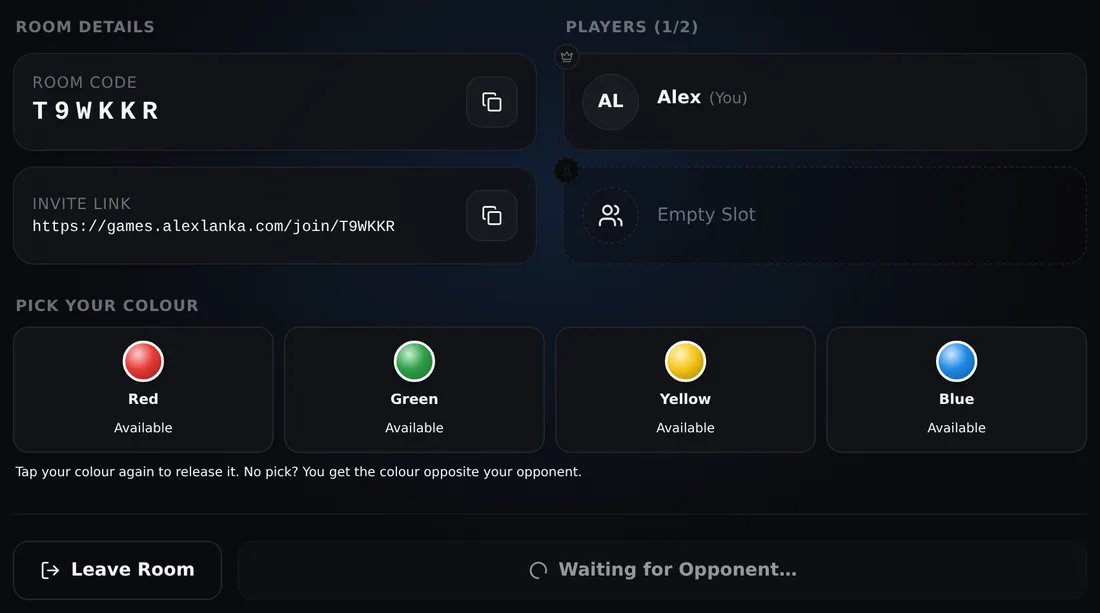
Choose “Play with Friend(s)” and create a room. You become the host. The room shows a six-letter code and an invite link; the code deliberately avoids letters and digits that look alike, so it is easy to read out over a call.
Step 3: invite your friends
Send the link through any chat app, or tell your friends the code. A friend who opens the link lands directly in your room; one who has the code opens the same game, chooses to join a room and types it in.
If you have added each other as friends on the site, you can also invite them straight from your friends list.
Step 4: settings, then Start
While the room fills, the host can change the game settings — a series length in Tic-Tac-Toe, for instance, or the number of laps in Drift Rush. When everyone is in, the host presses Start.
Playing in teams
Ludo and Carrom can be played two against two. In a team room each player takes a seat; partners sit opposite each other, as they would around a real board, and win or lose together.
Chat, emotes and a rematch
Every room has a chat for talking between moves, with animated emotes for the moments words are too slow. When a game ends, the host can start a rematch in the same room. In the two-player board games the winner of the last game moves first in the next, and after a draw the first move changes hands.
If a connection drops
Mobile connections come and go. If a player’s connection is lost, the game waits for a short time and shows the others that it is reconnecting; when the player returns, the game carries on from the same position. Only a player who leaves on purpose ends the match.
Why you can trust the result
Every move is checked by our server before it counts, and things like dice rolls and carrom shots are worked out there too. Each player’s screen only shows the result — so nobody can roll their own dice or move a piece they should not.
In short: Create a room, share the code, press Start. It takes less time than setting up a real board.